Collection Values (C-Values)
On this page
Collection Values, shown as C-Values in the menu, tells you what your collection cost, what it is estimated at, and what it is insured for. This article describes WrkLst 10.
The value sheet
Search by artist, title or inventory number, choose at the top of the filter whether the sheet covers all works, your Basket or one inventory, and narrow it further with the filter you know from Works: Availability with its Resales choice on top, everything else under Detailed search. The sheet shows the three figures side by side for every work that matches: Acquisition, Estimated and Insured. A dash means nothing is recorded. The Total counts every matching work, not only the page you see, and stays pinned above the rows as you scroll, so you always know what the current selection adds up to. With Acquisition information switched off under Settings › General Account › Optional inventory fields, the sheet has no Acquisition column and no acquisition total. On a phone the sheet leaves out the thumbnails, and a sheet wider than the screen scrolls sideways.
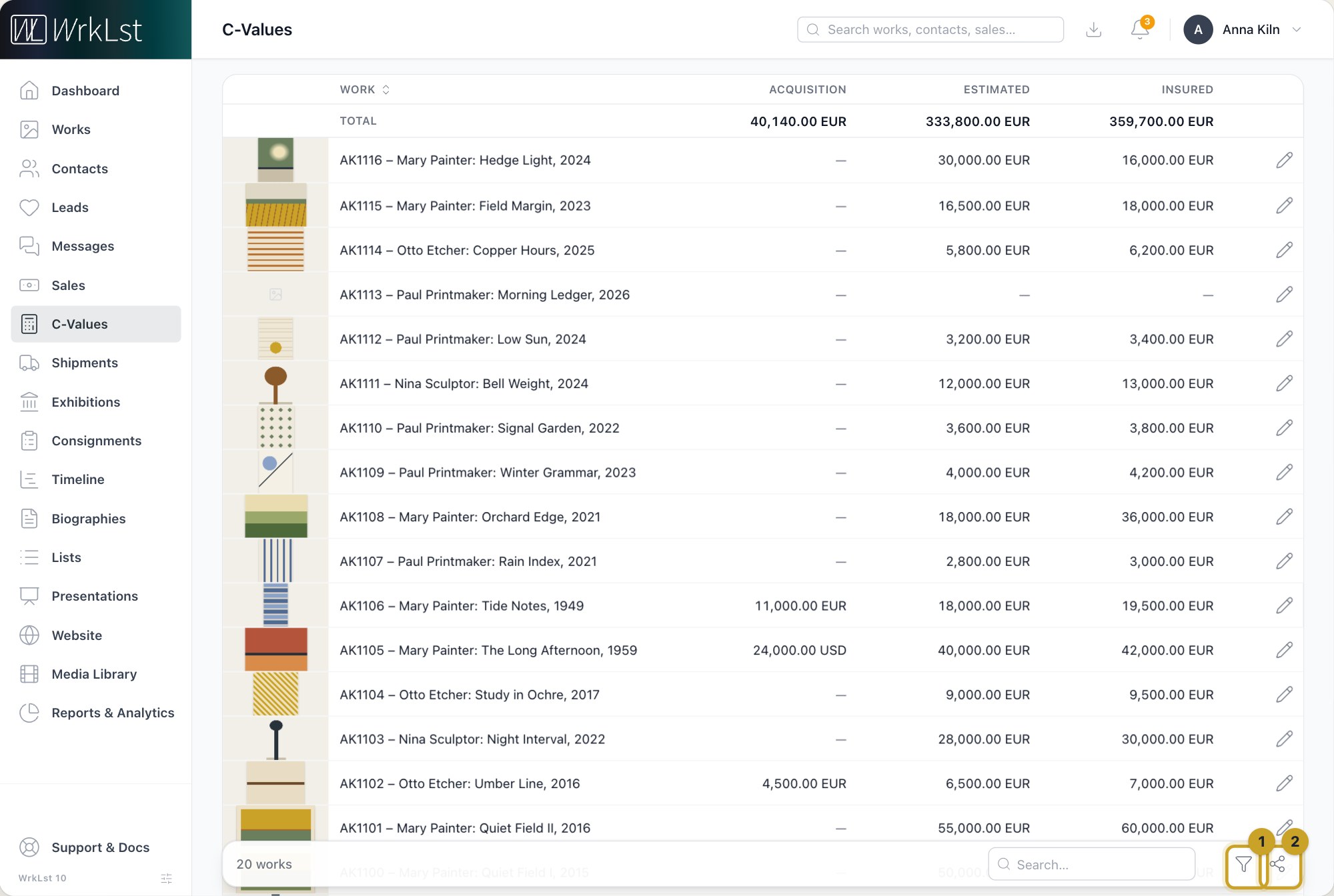
Collection Values: 1 Filter · 2 Share selection
Editing figures
Edit values, the pencil at the end of a work's line, opens the work's form at Insurance values, with Acquisition below it (shown when Acquisition information is switched on under Settings › General Account › Optional inventory fields). Save changes or Cancel brings you back to the sheet with the same filter, page and scroll position, and the line and the totals update.
For a new valuation, choose Add insurance value instead of overwriting the old figures. The new entry starts with today's date; note the source under Notes. The sheet and the totals use the valuation with the latest date, and earlier ones stay with the work.
Currencies
Every amount in a line keeps its own currency: the acquisition price in the currency it was paid in, the estimated and insured values in the currency of the valuation. The totals are converted into your account's default currency, set under Settings › Invoicing, at the latest exchange rates.
Who sees the figures
Who may open Collection Values is set per role under Settings › User Roles: tick View on the role's C-Values card and View on its Works card. The amounts are a right of their own, Read and edit values (acquisition, insurance) for works on the Works card; without it, every figure and every total shows a dash. Edit values also needs Edit & delete for works. The Administrator role includes Collection Values; the other system roles do not, and system roles cannot be edited, so give everyone else who needs it a role of your own that includes it.
What it is useful for
The obvious uses are insurance schedules and valuations. For the schedule itself, add the ready-made Insurance schedule template under Settings → Templates: Share selection then makes an Excel sheet of the works on the sheet with their insurance values and acquisition details. It is also the fastest way to answer questions that would otherwise take an afternoon: what a single artist's holdings are worth, what a room is worth before a loan, or how estimated value has drifted from purchase cost. For the same figures across the whole collection, see the Acquisition / Insurance report under Reports & Analytics.